Exciting New Update on Created Solid Formulas!

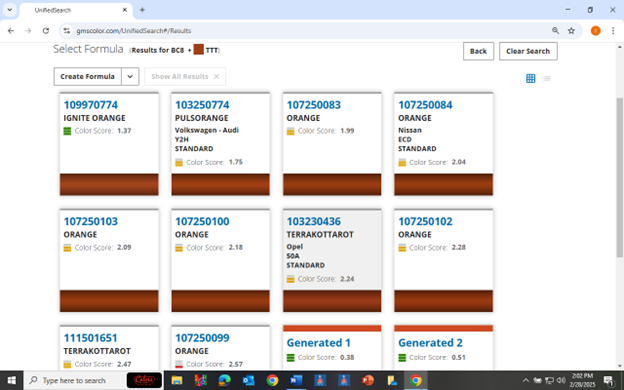
Just yesterday, one of our local techs was having no luck matching VW / Audi (Y2H) Pulse Orange. He was using the offline software, Formula Express GP. This color has only one formula in BC8 and it didn’t come close enough for a blendable match. So, he used his spectrophotometer and even though it was connected to the internet and searched the cloud for a match, it still came back with Pulse Orange being the best match. The issue was that it was looking for an existing formula. He called me and I had him connect to CCC (online Collision Core Color), connect the spectro to his computer and search for a formula there.
These are the results we got. As you can see, there was one formula that was just under the 1.5 color score. But, with the new “Created Solid” feature, the spectro was able to generate a formula from scratch with a color score of .09 ! He messaged me after he was done with a picture of a perfect match. As I posted back in January, this feature is available only on solid colors. It’s going to be a couple of years, according to SW, before it will be able to formulate effect colors.
I’ve been telling everyone from the start that they should be using Collision Core Color when they can. It is updated constantly, it is easier and faster to use, the results are better especially when using your spectro. Also, just in the situation yesterday, I can, or Sherwin’s help desk can log onto your account and see exactly what you are seeing and help resolve issues much faster.
Please contact me if you would like me to walk you through this.

Last year I went to the Sherwin Williams training center in Atlanta for a color theory class. At one point we were discussing the spectrophotometer (AKA, the camera). It was mentioned to us that sometime in the next couple of years, with the advancement of AI, the spectro will be able to formulate a color match from scratch. Up to this point the program has been able to use an algorithm to adjust an existing formula to better match your camera shot.
Just this week it was noticed that there was something new to choose from when selecting the best match for a solid color. There are the existing formulas with their color scores ranging from the best on down. Then you have the “Generated” formulas, again that uses an algorithm to adjust a current formula. And now, we have “Created Solid” formulas! These formulas are created from scratch and have a much better color score. We all know that we want a color score of 1.50 or less for a blendable match and a nice low score for a panel match. The example I have shown has an existing formula match rating of .52, a “Generated” color match of .37, and a “Created Solid” color match of .02. Yes, point zero two!
I spoke with Doug Fodrie at the Atlanta Training Center to ask him if this was in fact what I thought it was and if so, will this “Created” formula be coming out for "effect" colors. He did confirm that this is the case but added that it could be two years or longer before we see this available for the "effect" colors.
It was Doug Zalenski who ran into this and asked me about it. The next day I asked him if he had used the “Created Solid” formula. He told me, “On these RVs, the solid colors need to be "right on", to look good”. He said he almost always uses the “Generated” formula. This time he tried the first formula in the list. The color was no good. Then he tried the “Generated” formula. It was better but not good enough. Then he tried the new “Created Solid” formula and that was the ticket.
This feature is only available when using Collision Core Color (Online) and only with solid colors, and is available for both solvent and waterborne (Ultra 9K and BC8). In order to resize the formula, you will need to click on “Make Batch”. On the next page you will see that it states in blue, “Computer Generated #”. Click on that and it will take you to the formula page where you can resize it. If you will need that formula again, you can make it a batch from there.
As always, if you have any questions, contact me and I will be happy to assist you.
Happy Painting !!!


Comments